To say that the last few months of AI advancements have fundamentally and permanently changed how developers create software is quite possibly the understatement of the century in the software industry. Many of us who drifted into this line of work did so driven by the joy of building small programs and applications, learning the craft and the underlying technologies along the way. But if you’ve worked as a professional programmer anytime in the last 30 to 40 years, you know that it’s been decades since most projects were small enough to be built and maintained by a single engineer. We build complex systems that until recently required large teams. I’ve been managing just such a team for the last several years.
Nowadays, though, single engineers can build large projects very quickly, and small teams can build or modernize very large systems at record speed. AI changed all of that. Developers now build the skills, orchestrators, and automation layers that let AI agents build the actual software products. A fundamental shift. And you know what? Building the tools that allow AI to do these things actually makes software development fun again. Crazy!
But what about personal coding projects? I still find joy in learning new languages and building small applications and utilities by hand, but many of my projects are still too large for me to ever finish them this way. Too many hours at the day job and pursuing other hobbies that for me don’t involve AI (like writing this blog post, for example). That’s where Orbex comes in.
What is Orbex and what problem does it solve?

Orbex is a small, dependency-free workspace for working with an AI coding agent over a long period of time. A git repo holds the process for a project, and it sits beside the repos that hold the actual code. It works with Claude Code and Codex, off one set of files.
~/somewhere/
├── orbex/              # the machinery
└── my-workspace/       # yours — plans, memory, backlog
Orbex exists because an AI agent is good at the work, but bad at remembering why. Over months, four kinds of knowledge get confused with each other, and the confusion is expensive: a procedure written as a fact gets ignored, a fact written as a procedure never gets read, and anything maintained separately from the work it describes silently goes stale. Orbex keeps them apart, and gives each one a home that a session can find automatically.
| Lives in | Changes when | |
|---|---|---|
| Intent — what we’re doing and why | projects/<KEY>-N/plan.md | the work does |
| Facts about the codebase | CLAUDE.md | the code does |
| Facts learned the hard way | context/memory/ | reality does |
| Procedures too long to keep in context | .claude/skills/ | you improve them |
What you get
Orbex includes the following features which will get you up-and-running with AI on your own projects quickly and easily.
- Plan-first work.
/o-plancreates a numbered plan and stops for approval before any code is touched. Plans are append-only, because what a plan got wrong is the most valuable thing in it. - Versioned agent memory. Claude Code keeps project memory in a directory outside your repo, keyed to an absolute path. Orbex symlinks it into your workspace, so memory is in git — it travels between machines and gets committed with the work. (This one is Claude Code only: Codex has no equivalent memory directory to link.)
- Skills that travel. Both hosts only discover project skills at or below the session’s directory, so a session started in your code repo sees none of them.
bootstrap.shlinks each skill into the personal skills directory, making the names available everywhere. - A doctor.
node scripts/doctor.mjschecks that all of the above is actually wired up — symlinks that resolve rather than merely exist, memory at the right slug, a current index, valid frontmatter, no stale absolute paths. - Three lifecycle hooks that run the doctor at session start, warn when you’re behind
origin, and warn about uncommitted memory when a turn ends.
Even if you don’t stick with Orbex — new frameworks, models, and orchestrators are being released every month — you’ll learn about the best ways to work with AI which you can then apply to using other out-of-the-box solutions. Or you can even build your own like I have!
The skills
Orbex comes with the following fundamental skills to get you started.
| Skill | What it does |
|---|---|
o-plan | Start a numbered project and stop for approval before touching code |
o-next | Merge projects, backlog, GitHub Issues and overdue memory into one prioritized view |
o-dashboard | Generate the progress dashboard and open it in the browser |
o-ship | Verify it actually shipped, log what the plan got wrong, reconcile memory, close out |
o-doctor | Reconcile the workspace against reality |
o-help | List every skill command with a one-line summary, lifecycle first |
In Claude Code you run a skill as /o-plan; in Codex it’s $o-plan. Can’t remember which is which? /o-help lists every skill in your workspace with a one-line summary, with the ones every project passes through shown apart from the utilities. It reads the skills themselves each time it runs, so the skills you add show up there too.
Once you have your own workspace set up, you can start adding your own skills that know about your deploys, tests, and releases. This is all done through direct interaction with your chosen agent harness — Claude Code or Codex.
Progress dashboard
Orbex also includes a progress dashboard to help track your projects. In addition to a visual representation of the same backlog, inbox, and memory-review lists as /o-next, it displays other useful information like what’s in flight and for how long, the number of projects opened and closed per week, how long work takes from plan to done, and a timeline of recent work.
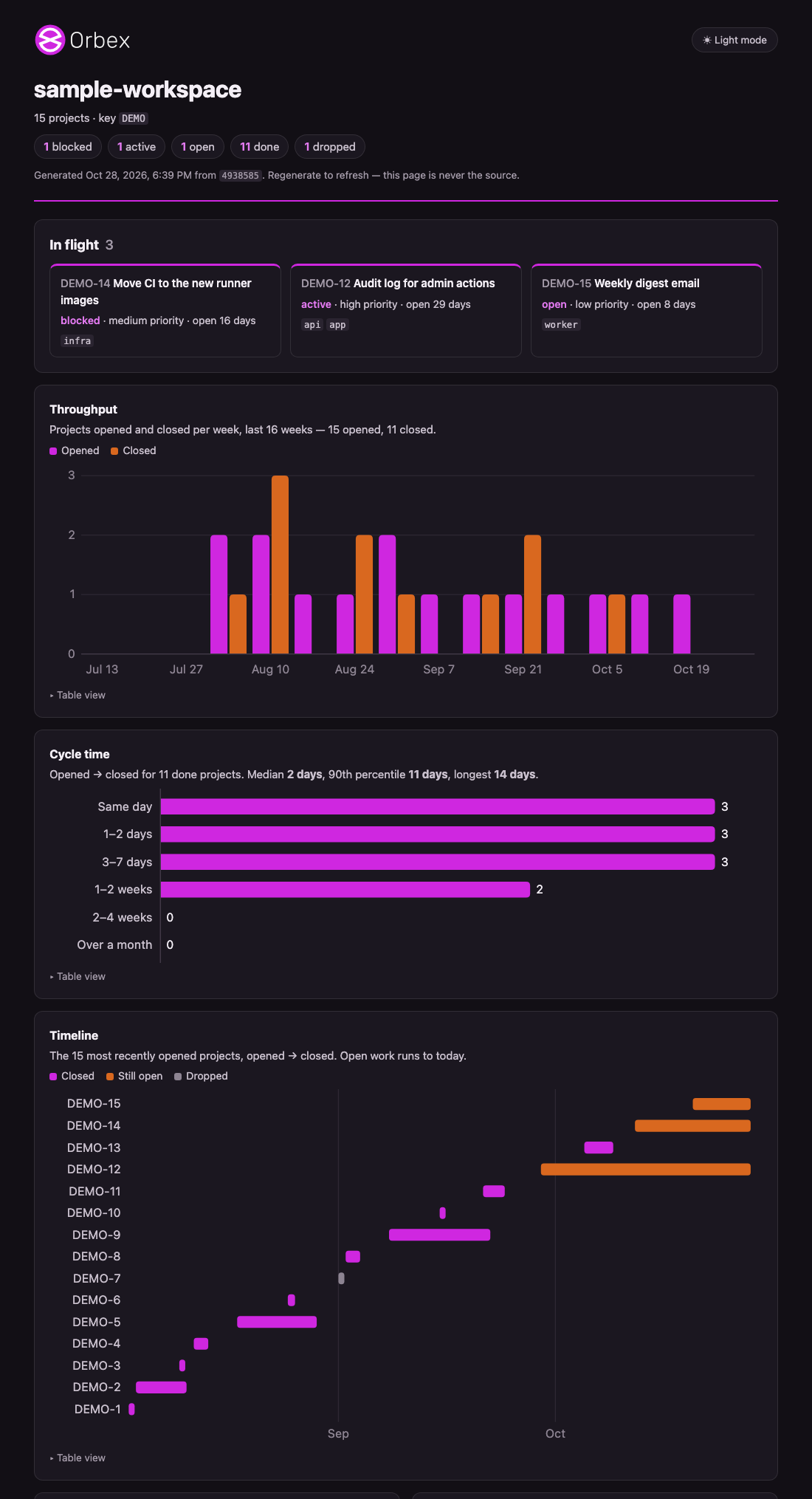
The dashboard is a renderer, not a source. It reads nothing itself: it runs scripts internal to Orbex and draws what they say. By default, it writes to your temp directory rather than the repo. A dashboard that kept its own status would be a second list to drift — the exact thing the tracking design exists to prevent — so the only way to refresh it is to regenerate it.
The screenshot comes from examples/sample-workspace/, a fabricated workspace you can render yourself:
ORBEX_WORKSPACE=examples/sample-workspace node scripts/dashboard.mjs --no-gh --openEvolved, not designed
It’s important to note that Orbex was extracted from a private workspace that I had been running for about four months, and its structure was iterated into existence rather than designed. Nearly every rule here exists because something went wrong first. You may notice references to this private history which are kept as rationale, but you can’t follow them.
The skills which were ported to Orbex are stable at this point and do not change often, but I will continue to improve them and commit changes from time to time. I’ll also be adding new features in the coming months that can be applied to any project.
Who it’s for and what it’s not
Orbex was built for me (or anybody) to work directly with an AI agent on a large project in an efficient, effective, and fun way. There’s no CI and no agents running unattended — the hooks only fire inside a session you started. This is intentional. Nothing here runs without you. It is a filing system with a checker attached, and most of its value is in the conventions rather than the code.
If you need to leverage AI for your company, you’ll need a way to share context across users which is not included here. If you want to build a competitive software product, you’ll need automation as well. But for building personal projects where you’re hands on and interacting with the AI — or just learning more about using AI — Orbex may be for you. You can also add integrations, automations, or anything else you may need to Orbex yourself. Just ask your AI agent how.
I hope you enjoy trying it out, and as always, I welcome feedback on any of my open source projects. Happy coding!